
GHOST/UFO/EMF Detector1.0.11 - Google Play
You'll be able to see results in few seconds.
Publisher Description
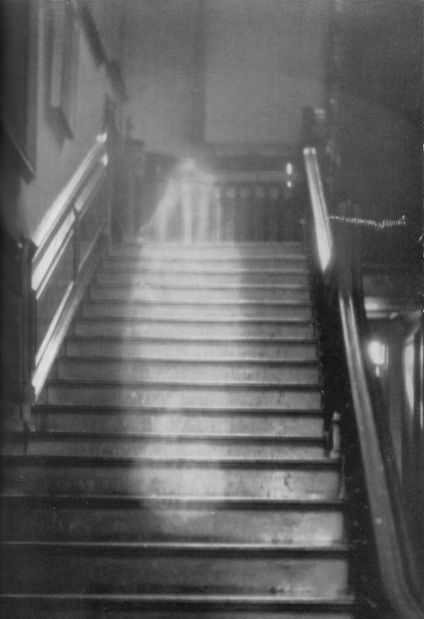

Sleep peacefully! knowing no entities, paranormal or aliens will be attempting to disturb or abduct you as this App will Alert you and scare off for good these intruders.The more people having this App, the more these entities will be deterred
Select the screen icon on the SENSORVIEW SCREEN top bar to turn on NIGHT VISION.
Select the flash icon on the SENSORVIEW SCREEN top bar to turn it into a TORCH.
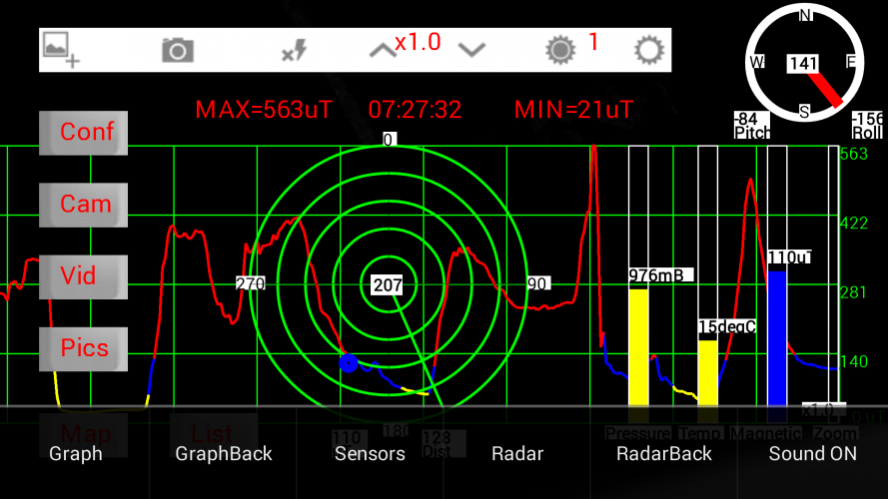
NEW - This has a new SENSORVIEW SCREEN recording continuously with a real time colour coded trace of the Magnetic Field on a grid as well MIN/MAX/TIME of Field Strength as well as the Directional Radar view,ready for instantaneous screen capture..
FOR EXAMPLE - the magnetic trace above was obtained by moving the App around a laptop, with the RED peaks appearing where the Wifi Antenna was, in this case at the top of the screen.
Try it, but not too close as the measurement (in micro Teslas) can go from normal background values ie 50 uT, to OVER A 1000 uT.
It also has Alarm Sounds indicating when the Magnetic field reaches certain thresholds.
Plus a new Filter Search feature on the Database LISTVIEW SCREEN.
Pictures now display Magnetic Field Strength, Atmospheric Pressure and Temperature data in Map View.
SENSORVIEW SCREEN now has Camera Zoom Slider and Picture Gallery display button (Pics).
Now with new buttons Cam(Camera) and Vid(Video) on the SENSORVIEW SCREEN , to enable Pictures and Videos to be taken by the phones Camera.
A Screen Grab can still be taken by pressing the Camera Icon on the top control bar of the SENSORVIEW SCREEN.
Also the Pictures can be viewed in either an ImageView or Other (which provides a choice of the phones viewers).
Welcome to the Ghost/UFO/Emf Detector App. This App enables you to take and store Pictures/Videos of UFO's/Unusual Phenomena together with the Geo Location,Compass Direction,Camera Elevation/Tilt, Magnetic Field Strength, Atmospheric Pressure and Temperature data then display the location with image on a on a Google Map and in Google Street View.
The Picture/Video can be shared along with the associated data through E-Mail, Facebook, Twitter, YouTube Bluetooth among others.
Along with the Map View showing the location/images of your observations , there is a Sensor View which replaces the Map with a view from the Camera. Superimposed on the camera view are the Radar,Compass, Magnetic Field Strength (micro Teslas), Temperature (deg Celsius) Atmospheric Pressure (milli Bars) and Camera Controls. (The Radar/Sensors/Sound can be removed/displayed by selecting the appropriate options from the the menu)
When the App begins there are 7 databases to chose from. The default names are UFOObserverX, where X is from 1 to 7. The names of each database can be changed using the Config utility in the Map screen menu. This enables you to have 7 separate Observation projects.
Along with the automatically saved data, you can enter your own observation notes in 8 Fields which can be named using the Config utility .
The database can be E-mailed to a Computer where the data can be read in to an Excel Spreadsheet from a CSV file.
A STREETVIEW Viewer also enables the selected database to be viewed in a combined Street/Map View on your computer in an Internet Explorer Browser,
RADAR detecting direction/magnitude of Magnetic Sources with appropriate sounds/warnings/alarms.
GRAPHS plotted of Magnetic Field Strength/Atmospheric Pressure and Temperature recordings
Tested On Samsung s2 , S4 and S7. The S4 has all the sensors required, other phones may not, and this will be indicated.
Night Vision works better on S2,S7 in SensorView,( as shown in the final image showing a Fire Exit Sign in low light conditions), than the S4 and may vary from phone to phone in effectiveness.
This will be continually deveoped.
Although primarily used for observation of UFO/Unusual Phenomena, by using SensorView, unusual Environmental Conditions can be detected and Pictured/Videoed, eg unusual High Magnetic Field areas.
About GHOST/UFO/EMF Detector
The company that develops GHOST/UFO/EMF Detector is App Lab. The latest version released by its developer is 1.0.11.
To install GHOST/UFO/EMF Detector on your Android device, just click the green Continue To App button above to start the installation process. The app is listed on our website since 2018-02-14 and was downloaded 0 times. We have already checked if the download link is safe, however for your own protection we recommend that you scan the downloaded app with your antivirus. Your antivirus may detect the GHOST/UFO/EMF Detector as malware as malware if the download link to com.dev.datacollector is broken.
How to install GHOST/UFO/EMF Detector on your Android device:
- Click on the Continue To App button on our website. This will redirect you to Google Play.
- Once the GHOST/UFO/EMF Detector is shown in the Google Play listing of your Android device, you can start its download and installation. Tap on the Install button located below the search bar and to the right of the app icon.
- A pop-up window with the permissions required by GHOST/UFO/EMF Detector will be shown. Click on Accept to continue the process.
- GHOST/UFO/EMF Detector will be downloaded onto your device, displaying a progress. Once the download completes, the installation will start and you'll get a notification after the installation is finished.
Program Details
System requirements
Download information
Pricing
Version History
version 1.0.11
posted on 2018-02-14
New MENU Selection In Map Display
Including :-
1/ Goto Latitude and Longitude Co-ordinates For Map.
2/ Display Present Position (Lat/Long/Address) And Accuracy.
3/ Configurate Database.
4/ Switch Between Statellite And Road Map View.
5/ Switch Sensor Display On/Off.
6/ Export/E-Mail The Details Of Your Database in CSV/XML Format To View In A Spreadsheet.
version 1.0.5
posted on 2016-09-03
Disclaimer
Official Google Play Link
We do not host GHOST/UFO/EMF Detector on our servers. We did not scan it for viruses, adware, spyware or other type of malware. This app is hosted by Google and passed their terms and conditions to be listed there. We recommend caution when installing it.
The Google Play link for GHOST/UFO/EMF Detector is provided to you by apps112.com without any warranties, representations or guarantees of any kind, so access it at your own risk.
If you have questions regarding this particular app contact the publisher directly. For questions about the functionalities of apps112.com contact us.
